The number of columns for each row in a table value constructor must be the same

What is table value constructor?

A set of row value expressions to be constructed into a table.

It can be specified/Used in the following forms
  • VALUE Clause in INSERT
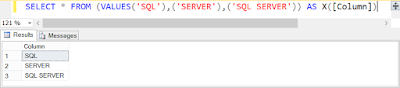
  • VALUE Clause in SELECT..FROM
  • VALUE Clause in MERGE..USING
  • VALUE Clause in JOIN
The number of values specified in each list must be the same and the values must be in the same order as the columns in the table.

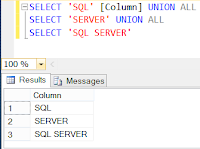
Usually, We need to use UNION or UNION ALL for Non-Table result set. Right ?


But, The same thing can be achieved by Table value constructor as below 


And, The number of values specified in each list should be matching!! 

If not - We can see the below Error


Msg 10709, Level 16, State 1, Line 1
The number of columns for each row in a table value constructor must be the same.

How does Azure work ?


  • It’s a Private and Public platform
  • It uses a Technology called as VirtualizationVirtualization separates the tight coupling a computer’s CPU and its operating system using an abstraction layer called hypervisor
  • The hypervisor emulates all the functions of a real computer and its CPU in a Virtual machine. It can run multiple virtual machine at the same time and each virtual machine can run any compatible operating system such as Windows, Linux
  • Azure takes this virtualization technology and repeats it on a massive scale in Microsoft data centers throughout the world. Each data center has many racks filled with servers
  • Each server includes a hypervisor to run multiple virtual machines
  • A network switch provides connectivity to the servers. One server in each rack runs a special piece of software called a fabric controller. Each fabric controller is connected to another special piece of software known as the orchestrator.  The orchestrator is responsible for managing everything that happens in Azure including responding to users’ requests
  • Users make requests using the orchestrator’s web API. The web API can be called by many tools including the user interface of the Azure portal
  • When a user makes a request to create a virtual machine, the orchestrator packages everything that’s needed, picks the best server racks, then sends the package and request to the fabric controller. Once the fabric controller has created the virtual machine, the user can connect to it
  • Azure make it easy for developers and IT professionals to be agile when they build, deploy and manage their applications and services. But this agility can have unintended consequences if unauthorized resources are created Or If resource are left running after they’re no longer needed
  • The solution to this problem is to use Azure’s resource access management tools as part of your organization’s governance program


Sourcehttps://azure.microsoft.com/en-in/resources/videos/azure-adoption-guide-how-does-azure-work/

Dynamic query with SP_EXECUTESQL vs. EXEC

sp_executesql is recommended over using the EXEC statement to execute a string of query because of the below reasons

1. Self-contained batches
Statements in sp_executesql or EXEC are not compiled to an execution plan until its executed (Not parsed/checked for errors)

DECLARE @hai VARCHAR(5)
SET @hai = 'HAI'
EXEC sp_executesql N'PRINT @hai'
GO
--Or
DECLARE @hai VARCHAR(5)
SET @hai = 'HAI'
EXEC ('PRINT @hai')
GO

The above both block fails - The variable @hai become out of scope/boundary

Msg 137, Level 15, State 2, Line 1
Must declare the scalar variable "@hai".

2. Substituting Parameter values
sp_executesql supports the substitution of parameter values for any parameters specified in the Transact-SQL string, but the EXEC statement does not.

The SQL Server query optimizer will probably match the Transact-SQL statements from sp_executesql with execution plans from the previously executed statements, saving the overhead of compiling a new  execution plan

With the EXEC statement, all parameter values must be converted to character or Unicode and made a part of the Transact-SQL string

USE [AdventureWorks2012]
GO
DECLARE @Query VARCHAR(100), @Param1 INT
SET @Param1 = 12742

SET @Query = 'SELECT * FROM Person.[Address] WITH(NOLOCK) WHERE AddressID ='CAST(@Param1 AS VARCHAR)
EXEC(@Query)

A completely new Transact-SQL string must be built for each execution, even when the only differences are in the values supplied for the parameters. This generates extra overhead in the following several ways:
- The ability of the SQL Server query optimizer to match the new Transact-SQL string with an existing execution plan is hampered by the constantly changing parameter values in the text of the string, especially in complex Transact-SQL
statements.
- The entire string must be rebuilt for each execution.
- Parameter values (other than character or Unicode values) must be cast to a character or Unicode format for each execution

sp_executesql supports the setting of parameter values separately from the Transact-SQL string

USE [AdventureWorks2012]
GO
DECLARE @Query NVARCHAR(100), @LParam1 INT
SET @LParam1 = 12742

SET @Query = N'SELECT * FROM [AdventureWorks2012].Person.[Address] WITH(NOLOCK) WHERE AddressID =@Param1'

EXEC sp_executesql @Query,N'@Param1 Int', @Param1 = @LParam1

- Because the actual text of the Transact-SQL statement does not change between executions, the query optimizer should match the Transact-SQL statement in the second execution with the execution plan generated for the first execution.
- Therefore, SQL Server does not have to compile the second statement.
- The Transact-SQL string is built only once.
- The integer parameter is specified in its native format. Conversion to Unicode is not required here.

Note: Object names in the statement string must be fully qualified (i.e: Database.Schema.Objectname) in order for SQL Server to reuse the execution plan.

3. Re-using execution plan

Using sp_executesql can help reduce the overhead while still allowing SQL Server to reuse execution plans.


sp_executesql can be used instead of stored procedures when executing a Transact-SQL statement a number of times, when the only variation is in the parameter values supplied to the Transact-SQL statement. Because the Transact-SQL statements themselves remain constant and only the parameter values change, the SQL Server query optimizer is likely to reuse the execution plan it generates for the first execution!

/*EXEC*/
USE [AdventureWorks2012]
GO
DECLARE @Param1 VARCHAR(10)
SET @Param1 = 'Gail'
EXEC ('SELECT p.FirstName, pp.PhoneNumber FROM Person.Person p WITH(NOLOCK) 
JOIN Person.PersonPhone pp WITH(NOLOCK)
ON (p.BusinessEntityID = pp.BusinessEntityID)
WHERE p.LastName = '''+ @Param1 + '''')
GO

The above statement executed 3 Times with various values(Goel, Gigi, Gail)

Check the execution plan generated (3 Separate Execution plans generated for every run based on the parameter value changes)


/*SP_EXECUTESQL*/
USE [AdventureWorks2012]
GO
DECLARE @Sql nvarchar(500)
SET @Sql = N'SELECT p.FirstName, pp.PhoneNumber FROM Person.Person p WITH(NOLOCK) 
JOIN Person.PersonPhone pp WITH(NOLOCK)
ON (p.BusinessEntityID = pp.BusinessEntityID)
WHERE p.LastName = @LastName';

DECLARE @ParamDefinition nvarchar(25) = N'@LastName Varchar(10)'
DECLARE @lLastName Varchar(10)
SET @lLastName='Gail'
EXEC sp_executesql @Sql, @ParamDefinition,
                   @LastName=@lLastName;
GO


Check the execution plan generated as above(Only 1 execution plan generated and Re-used for all the subsequent runs irrespective of it's parameter value - See - Use Count column as 3)

Here is the script used for the above screenshots:
WITH XMLNAMESPACES 
(DEFAULT 'http://schemas.microsoft.com/sqlserver/2004/07/showplan')
SELECT 
cp.usecounts [Use Count],
cp.objtype,
c.value('(QueryPlan/@CompileTime)[1]', 'int') [CompileTime(ms)],
c.value('(QueryPlan/@CompileCPU)[1]', 'int') [CompileCPU(ms)],
c.value('(QueryPlan/@CompileMemory)[1]', 'int') [CompileMemory(KB)],
LEFT(x.[text],50) + '...' + RIGHT(x.[text],10)  [Plan Text]
FROM sys.dm_exec_cached_plans AS cp CROSS APPLY sys.dm_exec_sql_text(cp.plan_handle) AS CROSS APPLY sys.dm_exec_query_plan(cp.plan_handle) AS qp
CROSS APPLY qp.query_plan.nodes('ShowPlanXML/BatchSequence/Batch/Statements/StmtSimple') AS n(c)
WHERE x.[text] LIKE '%SELECT p.FirstName%' AND x.[text] NOT LIKE '%sys.dm_exec_cached_plans%' 

Converting to unequal length truncates on Left Or Right ?

When converting string into Binary, I mean converted from the below data type 
CHAR
VARCHAR
NCHAR
NVARCHAR
TEXT
NTEXT to a BINARY data type of "unequal length", SQL Server truncates the data on the RIGHT!

Here is how...
Declare @Varchar Varchar(6), @Binary Binary(2)
Set @Varchar = 123456
Set @Binary = Cast(@Varchar as Binary(2))
Select @Varchar [Actual], Cast(@Binary as Varchar(6)) [Converted]
Go


When converting Numbers into Binary, The data is truncated on the LEFT and Padding is done with hexadecimal "zeros"

Wondering how.... ?

Declare @Source INT, @Target Binary(2)
Set @Source = 123456
Set @Target = Cast(@Source as Binary(2))
Select @Source [Actual], @Target, Cast(@Target as Int) [Converted]
Go


Actually, The Number should have been converted into 0x1E240

But, according to the unequal length of the target conversion, It truncates on LEFT and padding with "0" instead,

I mean "0x1E240" becomes "0x0E240". 

So, When converting back to numbers from binary - It becomes 57920

So, Beware of conversion from or to Binary!!!

Performing consistency check on Secondary/redundant copy of the database is fair enough?

It's actually "NO"

Checking consistency on secondary/copy of the source database does not imply that the source/primary database is free of corruption.

Since, Source and secondary are located in different I/O subsystems involved. right? Which means - consistency checking has to be performed in all environments to examine the actual corruption (I/O Perspective).

Because, None of the SQL Server redundancy technologies propagate the data file pages and I/O subsystem corruptions. Instead - It propagates the Transaction log records to the secondaries. So, there is NO point of performing such a consistency check only in Primary or secondary.

So, performing the consistency check on all the databases in every environment is considered as mandatory!!!

SELECT COUNT(*) - Always scans all the pages/rows ?

SELECT COUNT(*) always scans every rows (all pages/rows) in the table ?

No! - Not exactly! First, Ask the question - "The table has any Index ?"

How many Index are there in that table ? Each column type/size (allocation) ?

Why should I ask these questions ?

Here is the scenario!

A table "SystemObjects" created along with 2062 records
SELECT [schema_id], CAST([object_id] AS BIGINT) [object_id] , CAST(name AS NVARCHAR(200)) [name] INTO SystemObjects 
FROM sys.system_objects

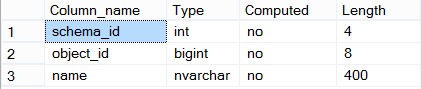
Table structure:


Trying to get record count (with Actual Execution Plan)

SELECT COUNT(1) FROM SystemObjects


YES! - Now, we got Table Scan operation with 94%. Yeah - This is what always happen right ?
Partially Yes and No!

Lets create a Non-Clustered Index:
CREATE NONCLUSTERED INDEX nci_obj_id ON SystemObjects([Object_id])

- Non-clustered Index has been created on Object_id column which is 8 Byte!

Trying to get record count (with Actual Execution Plan)

SELECT COUNT(1) FROM SystemObjects


We got Index Scan operation based on object_id column

Lets create an another Non-Clustered Index:


- Non-clustered Index has been created on schema_id column which is 4 Byte!

Trying to get record count again (with Actual Execution Plan)

SELECT COUNT(1) FROM SystemObjects


We got Index Scan operation again. But, this time based on schema_id column!!!

Confusing a bit right ?

See - How the Optimizer decides and goes based on what condition ? You believe Optimizer always tries to go with low cost. right ?

here is how...

Lets explore the current internal structure:
SELECT a.name, b.index_id, b.page_count, b.index_type_desc FROM sys.indexes a cross apply sys.dm_db_index_physical_stats(DB_ID(), a.[object_id] ,a.index_id,NULL,'LIMITED') AS b
WHERE a.[object_id] = OBJECT_ID('SystemObjects')


As you can see, The optimizer chooses to get the info from the smallest structure which will cost very less!!! right ? (Performance perspective)

here - The Optimizer decides to go with lowest pages to process with - So that the whole operation completes quickly/costs very less. Which is very effective/optimized operations.

The optimizer goes with "nci_schema_id" Index which is least pages (5 Pages)

If you remove the Index "nci_schema_id", The optimizer goes with "nci_obj_id" index which is least pages (6 Pages)

Once remove all the Indexes from the table - There is no other go - The Optimizer goes with Table scan (Scans all the Pages - 22 pages)

Here is the synopsis: The Optimizer goes with least pages which can be complete the process as quickly as possible with less cost!

Merry-go-round scanning ?

In SQL Server Enterprise edition, There is a strategy being followed when performing SCAN on tables! 

Its also called as "Advanced Scanning"

The advanced scan feature allows multiple tasks to share full table scans. If the execution plan of a Transact-SQL statement requires a scan of the data pages in a table and the Database Engine detects that the table is already being scanned for another execution plan, the Database Engine joins the second scan to the first, at the current location of the second scan. 

The Database Engine reads each page one time and passes the rows from each page to both execution plans

This continues until the end of the table's data is reached.

At that point, the first execution plan has the complete results of a scan, but the second execution plan must still retrieve the data pages that were read before it joined the in-progress scan. The scan for the second execution plan then wraps back to the first data page of the table and scans forward to where it joined the first scan. Any number of scans can be combined like this. The Database Engine will keep looping through the data pages until it has completed all the scans. This mechanism is also called "merry-go-round scanning" and demonstrates why the order of the results returned from a SELECT statement cannot be guaranteed without an ORDER BY clause.

i.e:, assume that you have a table with 500000 pages. User-1 executes a Transact-SQL statement that requires a scan of the table. When that scan has processed 100000 pages, User-2 executes another Transact-SQL statement that scans the same table. The Database Engine schedules one set of read requests for pages after 100001, and passes the rows from each page back to both scans. When the scan reaches the 200000 th page, User-3 executes another Transact-SQL statement that scans the same table. Starting with page 200,001, the Database Engine passes the rows from each page it reads back to all three scans. After it reads the 500000 th row, the scan for User-1 is complete, and the scans for User-2 and User-3 wrap back and start to read the pages starting with page 1. When the Database Engine gets to page 100000, the scan for User-2 is completed. The scan for User-3 then keeps going alone until it reads page 200000. At this point, all the scans have been completed

Without this strategy:
"Each user would have to compete for buffer space and cause disk arm contention. The same pages would then be read once for each user, instead of read one time and shared by multiple users, slowing down performance and taxing resources"

Tempdb should be some % size of Large Database in SQL Instance ?

It doesn't seem like that!!!

There is NO any arithmetic formula to calculate Tempdb Size. Yes ?

Do we have any ?

Yes. still we can calculate/figure out by performing the following things when storing Intermediate results

1. Memory Spill - Causing by Hash Or Sort operation
2. Rebuilding Index along with SORT_IN_TEMPDB Option
3. DBCC CHECKDB on Larg Database
4. Using Temp (#/##) Table
5. Using multiple aggregations with huge data

Tempdb doesn't behave like User Databases (Say suppose, If the User database grows up to 500 GB and It'll remain same even the SQL Instance restarts. Right ?

But, The Tempdb will be recreated with the Size to whatever the size it was last set to!!!

To avoid Memory Spill:
- Omit the ORDER BY clause if you do not need the result set to be ordered.
- If ORDER BY is required, eliminate the column that participates in the multiple range scans from the ORDER BY clause.
- Using an index hint, force the optimizer to use a different access path on the table in question.
- Rewrite the query to produce a different query execution plan.
- Force serial execution of the query by adding the MAXDOP = 1 option to the end of the query or index operation