
SELECT COUNT(*) always scans every rows (all pages/rows) in the table ?
No! - Not exactly! First, Ask the question - "The table has any Index ?"
How many Index are there in that table ? Each column type/size (allocation) ?
Why should I ask these questions ?
Here is the scenario!
A table "SystemObjects" created along with 2062 records:
SELECT [schema_id], CAST([object_id] AS BIGINT) [object_id] , CAST(name AS NVARCHAR(200)) [name] INTO SystemObjects
FROM sys.system_objects
Table structure:
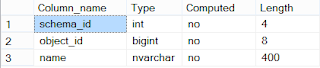
Trying to get record count (with Actual Execution Plan)
SELECT COUNT(1) FROM SystemObjects
YES! - Now, we got Table Scan operation with 94%. Yeah - This is what always happen right ?
Partially Yes and No!
Lets create a Non-Clustered Index:
CREATE NONCLUSTERED INDEX nci_obj_id ON SystemObjects([Object_id])
- Non-clustered Index has been created on Object_id column which is 8 Byte!
Trying to get record count (with Actual Execution Plan)
SELECT COUNT(1) FROM SystemObjects

We got Index Scan operation based on object_id column
Lets create an another Non-Clustered Index:
- Non-clustered Index has been created on schema_id column which is 4 Byte!
Trying to get record count again (with Actual Execution Plan)
SELECT COUNT(1) FROM SystemObjects

We got Index Scan operation again. But, this time based on schema_id column!!!
Confusing a bit right ?
See - How the Optimizer decides and goes based on what condition ? You believe Optimizer always tries to go with low cost. right ?
here is how...
Lets explore the current internal structure:
SELECT a.name, b.index_id, b.page_count, b.index_type_desc FROM sys.indexes a cross apply sys.dm_db_index_physical_stats(DB_ID(), a.[object_id] ,a.index_id,NULL,'LIMITED') AS b
WHERE a.[object_id] = OBJECT_ID('SystemObjects')

No! - Not exactly! First, Ask the question - "The table has any Index ?"
How many Index are there in that table ? Each column type/size (allocation) ?
Why should I ask these questions ?
Here is the scenario!
A table "SystemObjects" created along with 2062 records:
SELECT [schema_id], CAST([object_id] AS BIGINT) [object_id] , CAST(name AS NVARCHAR(200)) [name] INTO SystemObjects
FROM sys.system_objects
Table structure:
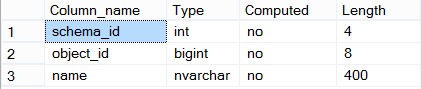
Trying to get record count (with Actual Execution Plan)
SELECT COUNT(1) FROM SystemObjects

YES! - Now, we got Table Scan operation with 94%. Yeah - This is what always happen right ?
Partially Yes and No!
Lets create a Non-Clustered Index:
CREATE NONCLUSTERED INDEX nci_obj_id ON SystemObjects([Object_id])
- Non-clustered Index has been created on Object_id column which is 8 Byte!
Trying to get record count (with Actual Execution Plan)
SELECT COUNT(1) FROM SystemObjects

We got Index Scan operation based on object_id column
Lets create an another Non-Clustered Index:
- Non-clustered Index has been created on schema_id column which is 4 Byte!
Trying to get record count again (with Actual Execution Plan)
SELECT COUNT(1) FROM SystemObjects

We got Index Scan operation again. But, this time based on schema_id column!!!
Confusing a bit right ?
See - How the Optimizer decides and goes based on what condition ? You believe Optimizer always tries to go with low cost. right ?
here is how...
Lets explore the current internal structure:
SELECT a.name, b.index_id, b.page_count, b.index_type_desc FROM sys.indexes a cross apply sys.dm_db_index_physical_stats(DB_ID(), a.[object_id] ,a.index_id,NULL,'LIMITED') AS b
WHERE a.[object_id] = OBJECT_ID('SystemObjects')

As you can see, The optimizer chooses to get the info from the smallest structure which will cost very less!!! right ? (Performance perspective)
here - The Optimizer decides to go with lowest pages to process with - So that the whole operation completes quickly/costs very less. Which is very effective/optimized operations.
The optimizer goes with "nci_schema_id" Index which is least pages (5 Pages)
If you remove the Index "nci_schema_id", The optimizer goes with "nci_obj_id" index which is least pages (6 Pages)
Once remove all the Indexes from the table - There is no other go - The Optimizer goes with Table scan (Scans all the Pages - 22 pages)
Here is the synopsis: The Optimizer goes with least pages which can be complete the process as quickly as possible with less cost!

