Showing posts with label SQL. Show all posts

SQL Server built-In monitoring components

First, It should have been determined on where/what to monitor for the current situation. right ? Yes!

And, select an appropriate tools to proceed with. It can be either from Windows Itself Or SQL Server specific

Windows Monitoring Tools:

SQL Server Tools:

Note: 
  • SQL Trace and SQL Server Profiler are deprecated. Avoid using this feature in new development work, and plan to modify applications that currently use this feature.
  • Use Extended Events instead

File "*.ps1" Cannot be loaded because running scripts is disabled on this system

With this title, I hope you already know what we are going to explore about...

You may get this Err, When you try to execute a PowerShell script file

Usually, This feature may have been Disabled due to security vulnerability

Try enable it and see. That's it!

Let's start here...

Let me try to execute a script file in PowerShell ISE (Integrated Scripting Environment)

Open PowerShell ISE


I have a simple script (Script1.ps1) to connect with my local SQL named Instance

I have opened the script in PowerShell ISE and Trying to execute it. But, I got the below Err


Which means, This feature has been Disabled in this environment, Let us enable it

To check with all available policies and It's status


See, All of them are Undefined

Let us enable one of them

Kindly explore all the available Policies and Scopes HERE, Before enabling it.


See, What we have enabled


Let us execute the script file again and see


Yes! Now It's working...

Post your question If you still have any Err 

Resources...

What is PowerShell?


DAC or Normally logged-in ?

How do I know whether I have logged-In as DAC or Normally logged-In ?

SELECT 'You have connected as "DAC"' [Who you are] 
FROM sys.dm_exec_sessions s join sys.endpoints  e
ON (s.endpoint_id = e.endpoint_id) 
WHERE e.name ='Dedicated Admin Connection'
AND s.session_id = @@spid
GO

1. Connect with Instance using SQLCMD by Trusted Connection

2. Paste the above script and execute it

Connect normally (Trusted Connection) using SQLCMD :-

Connect as DAC using SQLCMD :-


Converting to unequal length truncates on Left Or Right ?

When converting string into Binary, I mean converted from the below data type 
CHAR
VARCHAR
NCHAR
NVARCHAR
TEXT
NTEXT to a BINARY data type of "unequal length", SQL Server truncates the data on the RIGHT!

Here is how...
Declare @Varchar Varchar(6), @Binary Binary(2)
Set @Varchar = 123456
Set @Binary = Cast(@Varchar as Binary(2))
Select @Varchar [Actual], Cast(@Binary as Varchar(6)) [Converted]
Go


When converting Numbers into Binary, The data is truncated on the LEFT and Padding is done with hexadecimal "zeros"

Wondering how.... ?

Declare @Source INT, @Target Binary(2)
Set @Source = 123456
Set @Target = Cast(@Source as Binary(2))
Select @Source [Actual], @Target, Cast(@Target as Int) [Converted]
Go


Actually, The Number should have been converted into 0x1E240

But, according to the unequal length of the target conversion, It truncates on LEFT and padding with "0" instead,

I mean "0x1E240" becomes "0x0E240". 

So, When converting back to numbers from binary - It becomes 57920

So, Beware of conversion from or to Binary!!!

Performing consistency check on Secondary/redundant copy of the database is fair enough?

It's actually "NO"

Checking consistency on secondary/copy of the source database does not imply that the source/primary database is free of corruption.

Since, Source and secondary are located in different I/O subsystems involved. right? Which means - consistency checking has to be performed in all environments to examine the actual corruption (I/O Perspective).

Because, None of the SQL Server redundancy technologies propagate the data file pages and I/O subsystem corruptions. Instead - It propagates the Transaction log records to the secondaries. So, there is NO point of performing such a consistency check only in Primary or secondary.

So, performing the consistency check on all the databases in every environment is considered as mandatory!!!

Handling JSON with SQL Server

JSON is a popular textual data format that's used for exchanging data in modern web and mobile applications.

I have a sample JSON file contains Multi-language data. How to read it from the JSON file in SQL Server ?

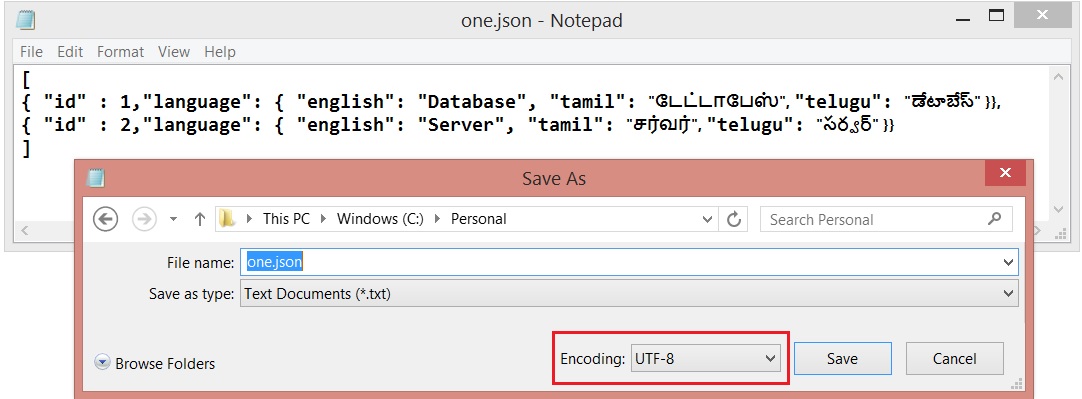
File Name : one.json
here we go....

In SQL Server 2016, There is an option to consume JSON file content using : OPENJSON

DECLARE @json NVARCHAR(MAX)
SELECT @json = BulkColumn FROM OPENROWSET (BULK 'C:\Personal\one.json', SINGLE_CLOB) j

SELECT * FROM OPENJSON(@json) 
WITH 
(
id int 'strict $.id',
English varchar(50) '$.language.english',
Tamil nvarchar(50) '$.language.tamil',
Telugu nvarchar(50) '$.language.telugu'
)

But, The result I got was..


It says, Multi-Language data has not been parsed when read it from the file.

According to MSDN, SINGLE_CLOB - Reads the content as ASCII. But we need to read as Unicode data

So, The following option used SINGLE_NCLOB which reads the content in Unicode

DECLARE @json NVARCHAR(MAX)
SELECT @json = BulkColumn FROM OPENROWSET (BULK 'C:\Personal\one.json', SINGLE_NCLOB) j

SELECT * FROM OPENJSON(@json) 
WITH 
(
id int 'strict $.id',
English varchar(50) '$.language.english',
Tamil nvarchar(50) '$.language.tamil',
Telugu nvarchar(50) '$.language.telugu'
)

The result was different.... I got an Error
Msg 13609, Level 16, State 4, Line 4
JSON text is not properly formatted. Unexpected character '⁛' is found at position 0.

What next ?

Let us see, How the JSON file was saved/used the Encoding ? Yes. It was UTF-8 :)


The File Encoding changed and saved it again as Unicode
  

And, I tried again...

DECLARE @json NVARCHAR(MAX)
SELECT @json = BulkColumn FROM OPENROWSET (BULK 'C:\Personal\one.json', SINGLE_NCLOB) j

SELECT * FROM OPENJSON(@json) 
WITH 
(
id int 'strict $.id',
English varchar(50) '$.language.english',
Tamil nvarchar(50) '$.language.tamil',
Telugu nvarchar(50) '$.language.telugu'
)

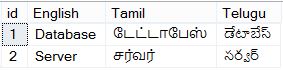
Yes. I got it now


Estimated/Actual Execution plan not displayed!!!

I have a Stored Procedure which was showing Execution Plan when execute it until some days back!!!

Suddenly, Execution plan not generating for the Procedure when I execute it!! But, Its executing and showing the result as expected.

I could not also see the Procedure definition and bellow is the Err!!

Msg 15197, Level 16, State 1, Procedure sp_helptext, Line 116
There is no text for object 'proc_sample2'.

What would be the reason ?

It seems like the Procedure's definition got !!! Encrypted !!!

Let's try to find out...

USE  <DatabaseName>
GO
SELECT CASE OBJECTPROPERTY([Object_ID],'IsEncrypted') WHEN 1 THEN 'YES' ELSE 'NO' END [IsEncrypted]
FROM sys.Objects WHERE type_desc ='SQL_STORED_PROCEDURE'
AND is_ms_shipped =0
AND Name='proc_sample2'
GO


Yes. That is correct!! The Procedure's definition got Encrypted. So that the Execution Plan can not be generated as per the MSDN Definition...

"Execution plans are not displayed for encrypted stored procedures or for triggers."

optimize for ad hoc workloads - Configuration Option

Normally, SQL Server compile, generate and stores the Plan for reuse. The process continues for all the following object types  
  • Proc
  • Prepared
  • Adhoc
  • ReplProc
  • Trigger
  • View
  • Default
  • UsrTab
  • SysTab
  • Check
  • Rule
For the every type of queries the process generates and stores the plan and every plan consume some Size.

Here, we going to see about the Transact-SQL statement also referred to as "Adhoc" query.

USE AdventureWorks2012 
GO
SELECT C.AccountNumber, SH.OrderDate, SH.DueDate, SH.TotalDue FROM Sales.SalesOrderHeader SH WITH(NOLOCK) JOIN Sales.Customer C WITH(NOLOCK)
ON (SH.CustomerID = C.CustomerID)
JOIN Sales.SalesTerritory ST WITH(NOLOCK)
ON (ST.TerritoryID = SH.TerritoryID) 
WHERE  ST.Name='United Kingdom'
GO

The following query to get the Stored Plan related Info for the above query
SELECT A.usecounts [Use Count], A.size_in_bytes [Plan Size(Bytes)],X.[text] [Query Used] FROM sys.dm_exec_cached_plans A CROSS APPLY sys.dm_exec_sql_text(A.[plan_handle]) AS X
WHERE A.objtype ='ADHOC' 
AND X.[Text] LIKE '%SELECT C.AccountNumber, SH.OrderDate%'


The plan consumes 72 KB (73728 Bytes) and the query uses 1st time. But, not sure whether the same plan going to be re-used next time. So, do we need to store the entire plan with consumes 72 KB at first time itself ?

No.

So, We have an option "optimize for ad hoc workloads" is used to improve the efficiency of the plan cache for workloads that contain many single use ad hoc queries/batches.

SP_CONFIGURE 'optimize for ad hoc workloads',1
RECONFIGURE WITH OVERRIDE

Done. 

As long as the above option is ON. All the Adhoc queries' entire plan are not going to be stored in Plan cache. But, the Database Engine stores a small compiled plan stub in the plan cache when a batch is compiled for the first time.

To Remove the specific plan from the cache
DBCC FREEPROCCACHE(0x06000A004230791470B5CC340100000001000000000000000000000000000000000000000000000000000000)
GO

Run the query at first time
USE AdventureWorks2012 
GO
SELECT C.AccountNumber, SH.OrderDate, SH.DueDate, SH.TotalDue FROM Sales.SalesOrderHeader SH WITH(NOLOCK) JOIN Sales.Customer C WITH(NOLOCK)
ON (SH.CustomerID = C.CustomerID)
JOIN Sales.SalesTerritory ST WITH(NOLOCK)
ON (ST.TerritoryID = SH.TerritoryID) 
WHERE  ST.Name='United Kingdom'
GO

The following query to get the Stored Plan related Info for the above query
SELECT A.usecounts [Use Count], A.size_in_bytes [Plan Size(Bytes)],X.[text] [Query Used] FROM sys.dm_exec_cached_plans A CROSS APPLY sys.dm_exec_sql_text(A.[plan_handle]) AS X
WHERE A.objtype ='ADHOC' 
AND X.[Text] LIKE '%SELECT C.AccountNumber, SH.OrderDate%'


Yes. Now, we got only 352 Bytes (small compiled plan stub) for the plan at first compile/use.

When run the same query again second time

Run the query at second time
USE AdventureWorks2012 
GO
SELECT C.AccountNumber, SH.OrderDate, SH.DueDate, SH.TotalDue FROM Sales.SalesOrderHeader SH WITH(NOLOCK) JOIN Sales.Customer C WITH(NOLOCK)
ON (SH.CustomerID = C.CustomerID)
JOIN Sales.SalesTerritory ST WITH(NOLOCK)
ON (ST.TerritoryID = SH.TerritoryID) 
WHERE  ST.Name='United Kingdom'
GO

Check whether the plan re-generated and stored entirely in Plan Cache
SELECT A.usecounts [Use Count], A.size_in_bytes [Plan Size(Bytes)],X.[text] [Query Used] FROM sys.dm_exec_cached_plans A CROSS APPLY sys.dm_exec_sql_text(A.[plan_handle]) AS X
WHERE A.objtype ='ADHOC' 
AND X.[Text] LIKE '%SELECT C.AccountNumber, SH.OrderDate%'


Now, New plan generated (See the use count column as 1) and stored the entire plan in plan cache (See the Plan Size(Bytes)).

Locking Hierarchy

SQL Server uses multi level of locking to allow different locks on various level of objects.

1. Lower level of locking on RID or KEY
RID - Row at heap (Actually doesn't have clustered Index)
KEY - Row at Clustered Index

2. Higher level of locking on Database

Hierarchies:
- Database (Highest level of locking)
- Database File
- Object
- Extent
- Page
- RID Or KEY (Lowest level of locking)

Note: SQL Server automatically decides on what level of lock should be placed to minimize the locking overhead.

How can I Truncate/Clear SQL Server Error Log ?

We may have faced an issue like SQL Server error log is getting filled with entries...!

So, We just want to clear the error log entries.. right ?

Oh.. Wait!

First, Tell me that How to read the entries from my SQL Server Error Log ?  (from Active/current file) then we can move into further ...:)

Read SQL Server Error log (Active file)
EXEC master.dbo.xp_readerrorlog 0, 1, NULL, NULL, NULL, NULL, N'desc'

Ok. Then how to write a new entry into the SQL server Error log ?

Log an entry into SQL Server Error log
RAISERROR('SQL Server Buddy',16,1) WITH LOG

Now,  Can we go further to clear the log entry ? YES

we can use either...

To clear SQL Server error log
DBCC errorlog
--or
EXEC sp_cycle_errorlog

NULL = NULL

One of my friend had discussion with me some days back that NULL is not equal to another NULL...! 

Is that TRUE ?

I said that "NO, IT IS NOT ALWAYS...!"

What that means.. "NOT ALWAYS" ?

In SQL Server, we have SET option called "ANSI_NULLS"

Is there any way to identify that what are all the options have been set to ON ?

DBCC USEROPTIONS
GO


Its a session specific option. So, It will list out What are all the user options have been set to ON along with some other options!

OK.

NULL is NOT EQUAL to another NULL. How ? 


When ANSI_NULLS is set to ON

SET ANSI_NULLS ON
GO


IF (NULL=NULL)
    PRINT 'EQUAL'
ELSE
    PRINT
'NOT EQUAL'
GO


Result : NOT EQUAL


NULL is EQUAL to another NULL. How ? 

When ANSI_NULLS is set to OFF

SET ANSI_NULLS OFF
GO

IF
(NULL=NULL)
    PRINT 'EQUAL'
ELSE
    PRINT
'NOT EQUAL'
GO

Result : EQUAL


So, NULL is not equal to another NULL - NOT ALWAYS, It depends on ANSI_NULLS option!

Unique Vs. Primary Key - Referential Integrity - Have you tried...?

When we create a Referential integrity, Parent column can be a PRIMARY KEY or UNIQUE column!
 

OK.
1. Crete a Parent Table
CREATE TABLE MasterTable1
(
Id    INT IDENTITY(1,1) PRIMARY KEY,
Column1 VARCHAR(10)
)
GO

2. Create a Child table & Refer MasterTable1
CREATE TABLE ChildTable1
(
Id    INT IDENTITY(1,1) PRIMARY KEY,
MasterID INT FOREIGN KEY REFERENCES MasterTable1,
Column2 VARCHAR(10)
)
GO

So, The above statement uses only the Parent Table name. But, not Primary Key column.

By default, It refers the PRIMARY KEY column of the reference table(MasterTable1). So, no need to give the PRIMARY KEY column name explicitly.

But, Have you tried with UNIQUE key for the same scenario ?


1. Crete a Parent Table
CREATE TABLE MasterTable1
(
Id    INT IDENTITY(1,1) UNIQUE,
Column1 VARCHAR(10)
)
GO


2. Create a Child table & Refer MasterTable1
CREATE TABLE ChildTable1
(
Id    INT IDENTITY(1,1) PRIMARY KEY,
MasterID INT FOREIGN KEY REFERENCES MasterTable1,
Column2 VARCHAR(10)
)
GO

You will get an Err message!

Msg 1773, Level 16, State 0, Line 1
Foreign key 'FK__ChildTabl__Maste__658C0CBD' has implicit reference to object 'MasterTable1' which does not have a primary key defined on it.
Msg 1750, Level 16, State 0, Line 1
Could not create constraint. See previous errors.


So, when referring an UNIQUE column, It should be TableName(ColumnName)


CREATE TABLE ChildTable1
(
Id    INT IDENTITY(1,1) PRIMARY KEY,
MasterID INT FOREIGN KEY REFERENCES MasterTable1(Id),
Column2 VARCHAR(10)
)
GO


So, Using TableName(columnName) is mandatory when referring an UNIQUE key column!!!
Simple way to identify the SQL Server service is running or not!

CREATE TABLE #Services(ServerName VARCHAR(255))

INSERT  #Services
EXEC  xp_cmdshell 'NET START'

IF  EXISTS (SELECT 1 FROM #Services WHERE ServerName LIKE '%SQL SERVER%')
   SELECT 'SQL Service is running' [Status]
ELSE
   SELECT 'SQL Service is not running' [Status]


DROP  TABLE #Services
GO

Where is the Object ? In which Database ?

I want to use one stored procedure or any other object name contains 'Blog' from current Server or Instance.

But, I don't know where is/are the procedure or object actually exists! or In which database ?

Is there any way to search an object in all the databases in current Instance ?
 
Use  Master
Go
Declare
@WhereIs Table

(
DBName Varchar(100),
ObjectName Varchar(150),
ObjectType Varchar(150)
)

Insert @WhereIs
Exec sp_msforeachdb 'use [?]; select DB_NAME(), name, Type_desc from sys.objects where name like ''%Blog%'''

Select * from @WhereIs
Go

Result:
 

Restoring Database - while the database is in use!

The following error will be thrown...! When try to restore a database while the same being used/accessed.

System.Data.SqlClient.SqlError: Exclusive access could not be obtained because the database is in use. (Microsoft.SqlServer.Smo)

The reason is very common as the Database being tried to restore is/are used/accessed somehere else through SSMS/Application(s)...

But, somebody says that, "First change the Database restrict access to SINGLE USER Mode and try to restore the same instead of KILLing the opened/accessed connections(SPIDs)"

Is that True ?

I don't think so!

Because, When you try to change the database restrict access to SINGLE USER mode using the below script/using the wizard. It'll close/KILL the opened/accessed sessions(SPID)

USE [Master]
GO
ALTER
DATABASE [DatabaseName] SET  SINGLE_USER WITH ROLLBACK IMMEDIATE

GO

Because, "SQL Server will close all other connections to the database" before change the Restrict access mode to SINGLE USER mode!

So, Changing the Database restrict access mode to SINGLE_USER will also close(KILL) all the connection(s) to the database!

Unknown object type '***' used in a CREATE, DROP, or ALTER statement.

Normally, we facing the error when we try to Create/Alter/Drop an object without specifying the Object Type(i.e: Table, Proc, Etc,..)

Create TestData
(
Column1 Varchar(15),
Column2 Varchar(15)
)

(or)

Create Sproc_Test1
As
Begin
Select GETDATE() [CDate]
End
 
In both script given above, We missedout the object type(which object we going to perform "Create"). we have missed out Table, Proc object type respectively in the scripts given above.
 
The actual script should be like as follows 
 
Create Table TestData
(
Column1 Varchar(15),
Column2 Varchar(15)
)

(or)

Create Proc Sproc_Test1
As
Begin
Select GETDATE() [CDate]
End

Job last run information

Use msdb
Go

Declare @job_id UniqueIdentifier
Select @job_id = Job_Id from sysjobs Where name='Job Name'
EXEC sp_help_jobserver @job_id = @job_id, @show_last_run_details = 1
Go

To fetch SQL Agent JOBs Info.,

To fetch SQL JOBs' information from the current Instance

Use Master
Go
 

EXECUTE msdb.dbo.sp_sqlagent_refresh_job
Go

Table-valued function 'Nodes' cannot have a column alias.

The following error occurred when we try to read xml data either from a Column or Expression...

1. XML data definition:
The following is the xml data, we just want to read data of Name and Place nodes.

Declare @xml xml
Select @xml = '<SQLBuddy><Name>Pandian S</Name><Place>Chennai</Place></SQLBuddy>'

The actual structure of the xml data is ...


2. Reading node value
Declare @xml xml
Select @xml = '<SQLBuddy><Name>Pandian S</Name><Place>Chennai</Place></SQLBuddy>'

Select Samples.[SQL].value('(Name)[1]', 'Varchar(100)') AS 'Name',
Samples.[SQL].value('(Place)[1]', 'Varchar(100)') AS 'Place'
FROM @xml.Nodes('/SQLBuddy') AS Samples([SQL])
 
It throws an error...
Msg 317, Level 16, State 1, Line 5
Table-valued function 'Nodes' cannot have a column alias.

Reason:
"nodes" is case sensitive. The actual script should be as follows
 
Declare @xml xml
Select @xml = '<SQLBuddy><Name>Pandian S</Name><Place>Chennai</Place></SQLBuddy>'
Select Samples.[SQL].value('(Name)[1]', 'Varchar(100)') AS 'Name',
Samples.[SQL].value('(Place)[1]', 'Varchar(100)') AS 'Place'
From @xml.nodes('/SQLBuddy') AS Samples([SQL])

Expected Result: