Merry-go-round scanning ?

In SQL Server Enterprise edition, There is a strategy being followed when performing SCAN on tables! 

Its also called as "Advanced Scanning"

The advanced scan feature allows multiple tasks to share full table scans. If the execution plan of a Transact-SQL statement requires a scan of the data pages in a table and the Database Engine detects that the table is already being scanned for another execution plan, the Database Engine joins the second scan to the first, at the current location of the second scan. 

The Database Engine reads each page one time and passes the rows from each page to both execution plans

This continues until the end of the table's data is reached.

At that point, the first execution plan has the complete results of a scan, but the second execution plan must still retrieve the data pages that were read before it joined the in-progress scan. The scan for the second execution plan then wraps back to the first data page of the table and scans forward to where it joined the first scan. Any number of scans can be combined like this. The Database Engine will keep looping through the data pages until it has completed all the scans. This mechanism is also called "merry-go-round scanning" and demonstrates why the order of the results returned from a SELECT statement cannot be guaranteed without an ORDER BY clause.

i.e:, assume that you have a table with 500000 pages. User-1 executes a Transact-SQL statement that requires a scan of the table. When that scan has processed 100000 pages, User-2 executes another Transact-SQL statement that scans the same table. The Database Engine schedules one set of read requests for pages after 100001, and passes the rows from each page back to both scans. When the scan reaches the 200000 th page, User-3 executes another Transact-SQL statement that scans the same table. Starting with page 200,001, the Database Engine passes the rows from each page it reads back to all three scans. After it reads the 500000 th row, the scan for User-1 is complete, and the scans for User-2 and User-3 wrap back and start to read the pages starting with page 1. When the Database Engine gets to page 100000, the scan for User-2 is completed. The scan for User-3 then keeps going alone until it reads page 200000. At this point, all the scans have been completed

Without this strategy:
"Each user would have to compete for buffer space and cause disk arm contention. The same pages would then be read once for each user, instead of read one time and shared by multiple users, slowing down performance and taxing resources"

Tempdb should be some % size of Large Database in SQL Instance ?

It doesn't seem like that!!!

There is NO any arithmetic formula to calculate Tempdb Size. Yes ?

Do we have any ?

Yes. still we can calculate/figure out by performing the following things when storing Intermediate results

1. Memory Spill - Causing by Hash Or Sort operation
2. Rebuilding Index along with SORT_IN_TEMPDB Option
3. DBCC CHECKDB on Larg Database
4. Using Temp (#/##) Table
5. Using multiple aggregations with huge data

Tempdb doesn't behave like User Databases (Say suppose, If the User database grows up to 500 GB and It'll remain same even the SQL Instance restarts. Right ?

But, The Tempdb will be recreated with the Size to whatever the size it was last set to!!!

To avoid Memory Spill:
- Omit the ORDER BY clause if you do not need the result set to be ordered.
- If ORDER BY is required, eliminate the column that participates in the multiple range scans from the ORDER BY clause.
- Using an index hint, force the optimizer to use a different access path on the table in question.
- Rewrite the query to produce a different query execution plan.
- Force serial execution of the query by adding the MAXDOP = 1 option to the end of the query or index operation

Is always good idea to use Temporary Table ?

No. Its NOT

As far as I know, Sometimes using Temp table improves performance and Sometimes Its not!

Creating a Temp table to hold intermediate results forces SQL Server to interrupt the data pipeline through a query to persist the results to disk.

Sometimes just doing one query rather than pre-aggregating or pre-sorting can be way more efficient and lead to far lower run time and tempdb usage!

So, "Always not good using Temp table to have intermediate aggregations/processing before resulting it"

It has to be compared with various methods with/without Temp table/CTE/table variable before implementing it in production environment!

So, Its not the case always do something Or always not to do something.

Importantly, make sure to pull only the data that's really required and create Non-clustered index after the table populated when using Temp tables to gain proper statistics created on that with actual loaded data!

Also, Creating more Non-clustered Index that aren't actually being used also causes the slowness on loading data and retrieving as well!

So, Non-clustered index to be created only based on the query plan actually using. 

There is no point of pulling Millions of records which is even not needed at all. Right ? But, Its happening most of times which can lead to enormous Tempdb usage!!!

TypePerf - Command-Line Tool

We have Windows Operating system Command-Line Tool called "TypePerf" Is used to collect performance metrics periodically and store it in a File or SQL Table for further analysis on what time and what kind of overhead taken place in Server/SQL Instance like Physical/Logical Memory/Disk/Processor/IO,.. Etc,...

Here is the syntax


1. List all the Performance Objects and Counters (Without Instance)
TypePerf -q

2. List all the Performance Objects and Counters (With Instance)
TypePerf -qx

3. List counters of a specific Object (i.e: PhysicalDisk)
TypePerf -q \PhysicalDisk


4. List counters of a specific Object with Instance (i.e: PhysicalDisk)
TypePerf -qx \PhysicalDisk


5. Show metrics for a specific Object with all Instances (i.e: PhysicalDisk)
TypePerf "\PhysicalDisk(*)\Current Disk Queue Length"


* - Represents all Instance of the Object "PhysicalDisk"

6. Show metrics for a specific Object with all Instances (i.e: PhysicalDisk) only 4 samples
TypePerf "\PhysicalDisk(*)\Current Disk Queue Length" -sc 4


By Default - Shows metrics until press CTRL + C

7. Show metrics for a specific Object with all Instances (i.e: PhysicalDisk) only 4 samples for every 2 Seconds
TypePerf "\PhysicalDisk(*)\Current Disk Queue Length" -sc 4 -si 2


Ok! How to show metrics for multiple Counters\Instance ?

Lets create a Counter file contains Counters\Instances whatever you want to collect the metrics

Counter file created : C:\Personal\MyCounter.txt


Refer the Counter file


To collect the metrics in SQL Server Tables!

Create a System DSN

here is the file you have to start with - C:\windows\system32\odbcad32.exe

My System DSN Name : MySQLServer
Change the default database to: TestingDB (The database already created in my SQL Instance)


And, here is the script!


The following THREE Tables created in TestingDB Database
dbo.CounterDetails
dbo.CounterData
dbo.DisplayToID

here is the performance metrics collected in SQL Server Table in TestingDB Database

DAC - Dedicated Administrator Connection

Why It's needed ?

SQL Server grands a special connection when normal/standard connection are not possible. So, The DAC helps DBAs to query and troubleshoot problems even normal/standard connection also not responding.

Note:DAC also may not possible under extreme situation! 

SQL Browser service should be running for Named Instance! But, Its not need for "Default Instance"

By default, DAC is allowed within the server. Only sysadmnin members are allowed to connect using DAC.

Connecting SQL Server from remote machine is not allowed unless they are configured "remote admin connections" using the sp_configure stored procedure

DAC only listens on the loop-back IP address (127.0.0.1), port 1434

If TCP port 1434 is not available, a TCP port is dynamically assigned when the Database Engine starts up

For DAC connection using sqlcmd

sqlcmd -SServer\Instance -A
Or
sqlcmd -S127.0.0.1 -A -- Default Instance
Or
sqlcmd -S127.0.0.1\Instance -A -- Named Instance
Or
sqlcmd -SAdmin:Server\Instance

DCA is declined with an Error 17810 If its already a DAC is running

Note: SQL Server Express does not listen on the DAC port unless started with a trace flag 7806

The DAC initially connects to the default database associated with the login. If the default database is offline or otherwise not available, the connection will return error 4060

"Microsoft recommends to connect the master database with the DAC because master is guaranteed to be available"

SQL Server prohibits running parallel queries or commands with the DAC.

The DAC session might get blocked on a latch. You might be able to terminate the DAC session using CTRL-C but it is not guaranteed. In that case, your only option may be to restart SQL Server

On cluster configurations, the DAC will be off by default

When connecting to the default instance, the DAC avoids using a SQL Server Resolution Protocol (SSRP) request to the SQL Server Browser Service when connecting

When connecting to the Azure SQL Database with the DAC, you must also specify the database name in the connection string by using the -d option.

Have you faced ?

The following Err occurred when I try to connect with SQL Server through Management studio!
Yeah!

"There was a resource limitation (insufficient memory or maximum allowed connections) on the server. (provider: Shared Memory Provider, error: 0 - No process is on the other end of the pipe.) (Microsoft SQL Server, Error: 233)"


It seems like the Maximum connection has been limited. Oh...

Then, How to fix/increase the Maximum connections ? 

here we go with DAC!

Ok. I need to connect with Named Instance


Check, What is the current MAX connections ?


Increase/Reset the MAX connections!


Reconfiguring the running value of the User Connections option requires restarting the Database Engine!

Yeah! It worked!!!

Handling JSON with SQL Server

JSON is a popular textual data format that's used for exchanging data in modern web and mobile applications.

I have a sample JSON file contains Multi-language data. How to read it from the JSON file in SQL Server ?

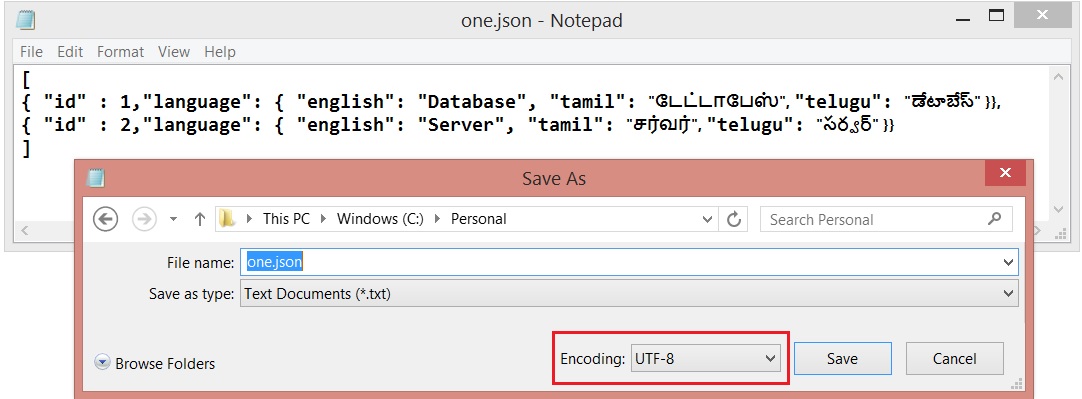
File Name : one.json
here we go....

In SQL Server 2016, There is an option to consume JSON file content using : OPENJSON

DECLARE @json NVARCHAR(MAX)
SELECT @json = BulkColumn FROM OPENROWSET (BULK 'C:\Personal\one.json', SINGLE_CLOB) j

SELECT * FROM OPENJSON(@json) 
WITH 
(
id int 'strict $.id',
English varchar(50) '$.language.english',
Tamil nvarchar(50) '$.language.tamil',
Telugu nvarchar(50) '$.language.telugu'
)

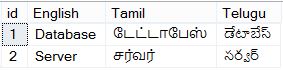
But, The result I got was..


It says, Multi-Language data has not been parsed when read it from the file.

According to MSDN, SINGLE_CLOB - Reads the content as ASCII. But we need to read as Unicode data

So, The following option used SINGLE_NCLOB which reads the content in Unicode

DECLARE @json NVARCHAR(MAX)
SELECT @json = BulkColumn FROM OPENROWSET (BULK 'C:\Personal\one.json'SINGLE_NCLOB) j

SELECT FROM OPENJSON(@json) 
WITH 
(
id int 'strict $.id',
English varchar(50) '$.language.english',
Tamil nvarchar(50) '$.language.tamil',
Telugu nvarchar(50) '$.language.telugu'
)

The result was different.... I got an Error
Msg 13609, Level 16, State 4, Line 4
JSON text is not properly formatted. Unexpected character '⁛' is found at position 0.

What next ?

Let us see, How the JSON file was saved/used the Encoding ? Yes. It was UTF-8 :)


The File Encoding changed and saved it again as Unicode
  

And, I tried again...

DECLARE @json NVARCHAR(MAX)
SELECT @json = BulkColumn FROM OPENROWSET (BULK 'C:\Personal\one.json'SINGLE_NCLOB) j

SELECT FROM OPENJSON(@json) 
WITH 
(
id int 'strict $.id',
English varchar(50) '$.language.english',
Tamil nvarchar(50) '$.language.tamil',
Telugu nvarchar(50) '$.language.telugu'
)

Yes. I got it now


Estimated/Actual Execution plan not displayed!!!

I have a Stored Procedure which was showing Execution Plan when execute it until some days back!!!

Suddenly, Execution plan not generating for the Procedure when I execute it!! But, Its executing and showing the result as expected.

I could not also see the Procedure definition and bellow is the Err!!

Msg 15197, Level 16, State 1, Procedure sp_helptext, Line 116
There is no text for object 'proc_sample2'.

What would be the reason ?

It seems like the Procedure's definition got !!! Encrypted !!!

Let's try to find out...

USE  <DatabaseName>
GO
SELECT CASE OBJECTPROPERTY([Object_ID],'IsEncrypted') WHEN 1 THEN 'YES' ELSE 'NO' END [IsEncrypted]
FROM sys.Objects WHERE type_desc ='SQL_STORED_PROCEDURE'
AND is_ms_shipped =0
AND Name='proc_sample2'
GO


Yes. That is correct!! The Procedure's definition got Encrypted. So that the Execution Plan can not be generated as per the MSDN Definition...

"Execution plans are not displayed for encrypted stored procedures or for triggers."

optimize for ad hoc workloads - Configuration Option

Normally, SQL Server compile, generate and stores the Plan for reuse. The process continues for all the following object types  
  • Proc
  • Prepared
  • Adhoc
  • ReplProc
  • Trigger
  • View
  • Default
  • UsrTab
  • SysTab
  • Check
  • Rule
For the every type of queries the process generates and stores the plan and every plan consume some Size.

Here, we going to see about the Transact-SQL statement also referred to as "Adhoc" query.

USE AdventureWorks2012 
GO
SELECT C.AccountNumber, SH.OrderDate, SH.DueDate, SH.TotalDue FROM Sales.SalesOrderHeader SH WITH(NOLOCK) JOIN Sales.Customer C WITH(NOLOCK)
ON (SH.CustomerID = C.CustomerID)
JOIN Sales.SalesTerritory ST WITH(NOLOCK)
ON (ST.TerritoryID = SH.TerritoryID) 
WHERE  ST.Name='United Kingdom'
GO

The following query to get the Stored Plan related Info for the above query
SELECT A.usecounts [Use Count], A.size_in_bytes [Plan Size(Bytes)],X.[text] [Query Used] FROM sys.dm_exec_cached_plans A CROSS APPLY sys.dm_exec_sql_text(A.[plan_handle]) AS X
WHERE A.objtype ='ADHOC' 
AND X.[Text] LIKE '%SELECT C.AccountNumber, SH.OrderDate%'


The plan consumes 72 KB (73728 Bytes) and the query uses 1st time. But, not sure whether the same plan going to be re-used next time. So, do we need to store the entire plan with consumes 72 KB at first time itself ?

No.

So, We have an option "optimize for ad hoc workloads" is used to improve the efficiency of the plan cache for workloads that contain many single use ad hoc queries/batches.

SP_CONFIGURE 'optimize for ad hoc workloads',1
RECONFIGURE WITH OVERRIDE

Done. 

As long as the above option is ON. All the Adhoc queries' entire plan are not going to be stored in Plan cache. But, the Database Engine stores a small compiled plan stub in the plan cache when a batch is compiled for the first time.

To Remove the specific plan from the cache
DBCC FREEPROCCACHE(0x06000A004230791470B5CC340100000001000000000000000000000000000000000000000000000000000000)
GO

Run the query at first time
USE AdventureWorks2012 
GO
SELECT C.AccountNumber, SH.OrderDate, SH.DueDate, SH.TotalDue FROM Sales.SalesOrderHeader SH WITH(NOLOCK) JOIN Sales.Customer C WITH(NOLOCK)
ON (SH.CustomerID = C.CustomerID)
JOIN Sales.SalesTerritory ST WITH(NOLOCK)
ON (ST.TerritoryID = SH.TerritoryID) 
WHERE  ST.Name='United Kingdom'
GO

The following query to get the Stored Plan related Info for the above query
SELECT A.usecounts [Use Count], A.size_in_bytes [Plan Size(Bytes)],X.[text] [Query Used] FROM sys.dm_exec_cached_plans A CROSS APPLY sys.dm_exec_sql_text(A.[plan_handle]) AS X
WHERE A.objtype ='ADHOC' 
AND X.[Text] LIKE '%SELECT C.AccountNumber, SH.OrderDate%'


Yes. Now, we got only 352 Bytes (small compiled plan stub) for the plan at first compile/use.

When run the same query again second time

Run the query at second time
USE AdventureWorks2012 
GO
SELECT C.AccountNumber, SH.OrderDate, SH.DueDate, SH.TotalDue FROM Sales.SalesOrderHeader SH WITH(NOLOCK) JOIN Sales.Customer C WITH(NOLOCK)
ON (SH.CustomerID = C.CustomerID)
JOIN Sales.SalesTerritory ST WITH(NOLOCK)
ON (ST.TerritoryID = SH.TerritoryID) 
WHERE  ST.Name='United Kingdom'
GO

Check whether the plan re-generated and stored entirely in Plan Cache
SELECT A.usecounts [Use Count], A.size_in_bytes [Plan Size(Bytes)],X.[text] [Query Used] FROM sys.dm_exec_cached_plans A CROSS APPLY sys.dm_exec_sql_text(A.[plan_handle]) AS X
WHERE A.objtype ='ADHOC' 
AND X.[Text] LIKE '%SELECT C.AccountNumber, SH.OrderDate%'


Now, New plan generated (See the use count column as 1) and stored the entire plan in plan cache (See the Plan Size(Bytes)).

Locking Hierarchy

SQL Server uses multi level of locking to allow different locks on various level of objects.

1. Lower level of locking on RID or KEY
RID - Row at heap (Actually doesn't have clustered Index)
KEY - Row at Clustered Index

2. Higher level of locking on Database

Hierarchies:
- Database (Highest level of locking)
- Database File
- Object
- Extent
- Page
- RID Or KEY (Lowest level of locking)

Note: SQL Server automatically decides on what level of lock should be placed to minimize the locking overhead.

Active Transactions - How long, Current State, Bytes Reserved/Used, Which DB and What Query ?

SELECT 
CASE dbt.database_id WHEN 32767 THEN 'Resource' ELSE D.name END [DB],
a.session_id [Session],
a.open_transaction_count [Tran. Count],
b.transaction_begin_time [Tran. Started at],
DATEDIFF(SECOND,b.transaction_begin_time,GETDATE()) [Tran. Active(Second(s))],
CHOOSE(b.transaction_type,'Read/write transaction','Read-only transaction','System transaction','Distributed transaction') [Tran. Type],
CHOOSE(b.transaction_state,'The transaction has been initialized but has not started.','The transaction is active.','The transaction has ended. This is used for read-only transactions.','The commit process has been initiated on the distributed transaction. This is for distributed transactions only. The distributed transaction is still active but further processing cannot take place.','The transaction is in a prepared state and waiting resolution.','The transaction has been committed.','The transaction is being rolled back.','The transaction has been rolled back.') [Transaction Sate],
dbt.database_transaction_log_bytes_reserved [Log reserved (Bytes)],
dbt.database_transaction_log_bytes_used [Log used (Bytes)],
x.[text] [Actual Query]
FROM sys.dm_tran_session_transactions a JOIN sys.dm_tran_active_transactions b
ON (a.transaction_id = b.transaction_id)
JOIN sys.dm_exec_connections C ON (a.session_id = C.session_id)
JOIN sys.dm_tran_database_transactions DBT ON(dbt.transaction_id = b.transaction_id)
LEFT JOIN sys.Databases D ON (D.database_id = DBT.database_id) 
CROSS APPLY sys.dm_exec_sql_text(C.most_recent_sql_handle) x